Frequently Asked Questions
Virtual Private Servers, or VPS, present an efficient server solution designed to optimize costs and enhance efficiency for businesses of various scales. Oplink.net VPS offers the same exceptional network and DDoS protection as our data center but at a more economical price point.
Our VPS are hosted within our state-of-the-art data center, liberating companies from the complexities and expenses of managing their own server rooms. The resources of the VPS are strategically allocated among different teams or companies, allowing them to fully utilize the capabilities of the compute resource or node server.
Leveraging advanced KVM virtualization technology, each node server is divided into multiple virtual machines. Each machine is fully equipped to operate its own independent operating system with complete root or admin access, ensuring autonomy and flexibility.
The result is a server solution that empowers businesses to enjoy significantly lower monthly costs, eliminating the financial burden of hardware and setup expenses. Oplink.net VPS is an ideal choice for businesses seeking a balance of performance, security, and cost-effectiveness.
For a deeper understanding of VPS, we invite you to explore these informative articles we’ve curated from trusted online sources. They provide valuable insights and detailed perspectives on VPS technology.
You can choose from a wide range of popular Linux or Windows distributions: AlmaLinux, CentOS, Debian, Ubuntu, Windows 11 Pro, or Windows Server 2022. Windows license is not included. We can also install custom ISO’s upon request.
Our network offers the lowest latency multi-homed backbones with 100Gbps Uplink to Lumen and 100Gbps Uplink to Cogent. We include Free DDoS Protection with up to 100Gbps powered by Corero. Our high bandwidth network will provide you with the fastest network connection at all times.
All Cloud VPS plans include:
10Gbps Internet Ports, the monthly data limit is listed on the plan specs.
All Colocation & Dedicated Servers include:
1Gbps Unmetered port, Optional Upgrade to 10Gbps, Email us for details [email protected]
Yes, we recommend you always purchase backups to protect your data when its production and mission critical. Backup Storage options are available at the checkout process.
We backup weekly and keep 2 copies. This allows for up to 500G of backup space. They are full VPS IMAGE BACKUPS.
You can do a restore from our client portal or we can do the restore for you. Restores will wipe all data currently on your VPS server and restore to the last backup.
Yes, with our easy to use panel you can reinstall any time.
You can choose from a wide range of popular Linux or Windows distributions: AlmaLinux, CentOS, Debian, Ubuntu, Windows 11 Pro, or Windows Server 2022. Windows license is not included. We can also install custom ISO’s upon request.
Yes, you can upgrade to any higher plan any time to give you more resources.
We also recommend you check out Virtual Dedicated Servers or Dedicated Servers if you want more resources and customization.
NVMe is the latest storage technology, it’s all the fastest. NVMe drives can usually deliver a sustained read-write speed of 3.5 GB/s in contrast with SATA SSDs that limit at 600 MB/s. If you want the fastest pick NVMe, if you need more storage space SSD maybe your better option.
No, these plans are made to be used to backup and store large files. We recommend you always have an offsite backup.
Yes, you can upgrade to any higher plan any time to give you more resources. However, once you upgrade your storage size you can’t downgrade.
We also recommend you check out Cloud Virtual Dedicated Servers or Dedicated Servers if you want more resources and customization.
Virtual Dedicated Servers (VDS) are 100% dedicated to only you with 0% resource sharing. We combine the best of VPS and Dedicated Servers. This provides you with the instant upgrades, instant server provisioning, and easy to manage portal. Unlike VPS (which share compute resources with other users on the node) VDS has 0% sharing! 100% of the server resources are dedicated to only you!
The main factors that separate VDS, VPS, and Dedicated Servers are setup and administration. With a dedicated server, you (as the owner) manage all facets of the machine’s administration – from its core configuration to the data hosted, you maintain all control and responsibility down to the bios/ipmi if you choose to. On VDS, we manage the core configuration at the bare metal level. Each VDS nodes runs a tiny Linux OS that allows easy management. This gives you the instant setup and easy to use portal features that come with VPS, but VDS gives you 100% of the resources. Virtual Private Servers mirror VDS, but you share compute resources with other users.
VDS Slices are something new we rolled out in 2026. They are LOW USER RATIO VDS nodes/servers. What this means is you will only share that node with 4 servers. This allow us to give you more resources; vcores, memory, and storage. VDS Slices are basically 1/4 of the full dedicated server hardware without paying the full cost of bare metal!
-
Website Hosting
Host your websites on a powerful VPS/VDS with high resources, ensuring fast loading times, high availability, and a seamless user experience. -
Application Hosting
Deploy applications on a secure, scalable VPS/VDS, customized to meet your business development and usage needs. -
Database Management
Manage and store databases on a reliable, high-speed VPS/VDS designed to handle demanding workloads with scalability. -
Website Hosting, WordPress Hosting, Secure Email Hosting
Create and manage websites and secure email hosting. -
Game Server Hosting
Run online game servers, such as Minecraft, Counter-Strike, or DayZ, on a secure and scalable VPS/VDS for private gaming experiences. -
Test Server Deployment
Set up a virtual sandbox in seconds to streamline your workflow from development to production. -
Trading Application Hosting
Execute Forex trading strategies on a high-performance, stable VPS/VDS optimized for market demands.
Choosing the right VDS is an important decision to make. Server configuration should be based around core business needs and hosting requirements. In general, the main specs to consider are the following: CPU, Memory and Storage.
- Option 1: Highest clock rate CPU: When it comes to CPU, a higher CPU clock frequency will naturally deliver faster single core performance. Our highest CPU clock rates and most powerful are the AMD 9950x VPS servers. This is what makes the most popular market for a reason! These work for just about anything and excel with everything like game servers, databases, large websites, or and online trading.
- Option 2: Higher core count: With a higher vcore count will naturally deliver faster multicore performance – this would be necessary if you have lot of traffic, users, or website views.
- Option 3: High Memory maybe necessary if you need to host larger services or websites that require more disk space.
- Option 4: High Storage: All of our VPS nodes use mostly NVMe storage, except for standard storage vps which uses 100% SSD. Both are far more durable, and lightning fast compared to older standard HDDs.
As the name suggests, a dedicated server is a server that doesn’t share or borrow physical resources. This means you can benefit from all of the available storage and power. Unlike virtual servers (which use a portion of the machine’s resources to power virtualization technology) 100% of the resources are made available, all of the time.
While the exact number will vary depending on the server’s CPU and RAM, a single dedicated server should be able to host between 150 – 500 websites.
The Oplink.net datacenter is located in Spring, Texas. Our colocation facility consists of 27 racks located in a large private cage inside the TRG Datacenter.
Oplink.net Datacenter (inside TRG Datacenters)
2626 Spring Cypress RD
Spring, TX 77388
281-445-9800
All colocation, dedicated servers, virtual private servers, and virtual dedicated servers are located in this colocation facility.
Choosing the right dedicated server is an important decision to make. Server configuration should be based around core business needs and hosting requirements. In general, the main specs to consider are the following: CPU, RAM and Storage. When it comes to CPU, a higher CPU clock frequency will naturally deliver faster performance – but this may not be necessary if you run a small to medium sized enterprise. Minimum RAM starts at 16GB, with more necessary if you need to host larger services. For storage, all of our server plans use SSD or NVMe, which are far more durable and lightning fast compared to standard HDD.
Yes, we operate with a 100% uptime guarantee for all server colocation customers. All colo servers in our facility offer N+1 electrical design with dual redundant UPS and battery backups. Dual backup power generators are situated inside the building and protected from weather. This all ensures the risk of downtime is completely minimized.
Our colocation facility is indeed carrier neutral. The data center isn’t owned or managed by a specific ISP – we find this affords our customers a greater degree of control and flexibility.
Yes, we do offer reverse IPv4 DNS with all services. At this time we do not offer RDNS for IPv6. All RDNS requests can be made by opening a ticket.
To setup RDNS on your static IP(s) please open a ticket.
Copy-n-Paste the following template into the body of the ticket and edit it for your IP & host.domain.com.
1 IN PTR host.domain.com.
2 IN PTR host.domain.com.
3 IN PTR host.domain.com.
*Please make sure you leaving the trailing . at the end of each PTR record.
Any client running a email server MUST have a PTR record per our AUP.
Yes, you must open a ticket to request an appointment to access your equipment inside the datacenter. We prefer a 24 hour notice if possible. We will respond to the ticket quickly and send further directions for your visit.
Yes, many of our out of state clients ship us hardware. Our team offers a full rack and stack service at no cost. We also provide all rackmounts and cables. Please contact us to coordinate your install before shipping any hardware.
Speed test: https://oplink.speedtestcustom.com/
Raw Speed test File: https://www.oplink.net/speedtest/raw/1000mb.zip
Test IP: 216.230.224.34 or 216.230.227.34
We offer High Storage VPS Stash accounts that you can backup data to. They include 2TB of storage, they make great backup destination that you can fully customize.
Yes, we provide a /64 with all colocation or dedicated servers upon request from the client.
Web hosting is a service that stores and serves your website files on a ultra fast powerful server in our datacenter. Our web hosting services also include email hosting.
Customers effectively rent space on a physical server, where their files and data can be stored safely. This enables businesses to provide a reliable online website.
Our customer support team is on hand whenever you need them. With decades of experience under their belts, our team can help solve almost any issue you throw at them.
So, whether you’ve encountered an unexpected error message, you’re having trouble with slow loading speeds or you’re unsure about a new setup process, don’t hesitate to ask.
Customers can contact support via email or open a support ticket whenever they need help.
Whether you already own your domain name or you’re looking to purchase a new one while you set up your web hosting, our team can help.
Contact us to find out more about connecting your domain name. We’ll talk you through exactly what you need to do to get your domain up and running.
Fiber internet is a type of internet connection which runs through optical fiber. It’s a later development than cable internet, and as such it provides a superior service to users. When you switch to fiber internet, you’ll immediately discover just how much faster it is.
Oplink.net provides a number of different fiber internet packages for businesses in the Houston area. Talk to our team about your company’s requirements and we’ll be able to advise you on the best package for your business.
Oplink.net is available throughout Houston and the surrounding areas. If you’re unsure whether or not we cover your area, just give us a call. Our team will be able to quickly check whether or not Oplink.net is available in your area.
Oplink.net provides a wealth of benefits to both home and business users. Our fiber internet packages are lightning quick, cost-effective and brilliantly reliable. If you’d like to find out more about why Oplink.net is fast becoming the most popular internet provider in Houston, give our team a call.
New clients should use this URL until your DNS propagates: https://cpanel1.oplink.net:2083/
After DNS fully propagates, we commend you use https://cpanel.yourdomain.com or https://yourdomain.com/cpanel either will work.
Yes, all of our new Internet Service plans comes with a CPE modem that has built in WIFI. Optionally if you want to use your own Wifi router/access point you can.
After you place an order with us we will open a tracking ticket for the Internet Service Order. We use our partner with AT&T to deliver fiber internet to your home or business. We will coordinate an AT&T technician to come install your new service. Most installs are installed in about 5-7 business days. We will use the tracking ticket to fully update you during the install process, including scheduling a day/time for your install. If you have any additional questions about the install process you can reply to the ticket.
- Do not press the reset button on the back of the modem.
- Reboot the modem installed by AT&T by pulling black power cord on the back of the device, leave unplugged for 30 seconds.
- While the modem is off, disconnect all cables to the back of the device ONE BY ONE, plug them back into the original location. This will ensure nothing became knocked loose.
- Reconnect power cable to modem, power up may take up to a full 5mins.
- While your waiting, Restart computer.
- Check to see if you can surf the internet again.
- If you can RUN speedtest again to see if you have fixed your trouble: https://www.oplink.net/speedtest
- If you can’t please open a support ticket or call support 281-445-9800
- Do not press the reset button on the back of the modem.
- RUN a speedtest and get a baseline to see what your service is running at: https://www.oplink.net/speedtest
- Reboot the modem installed by AT&T by pulling black power cord on the back of the device, leave unplugged for 30 seconds.
- While the modem is off, disconnect all cables to the back of the device ONE BY ONE, plug them back into the original location. This will ensure nothing became knocked loose.
- Reconnect power cable to modem, power up may take up to a full 5mins.
- While your waiting, Restart computer.
- RUN speedtest again to see if you have fixed your trouble: https://www.oplink.net/speedtest
If you can’t please open a support ticket or call support 281-445-9800
Yes, in May 2020 we added a hardware DDoS Protection based solution powered by Corero. We include up to 100Gbps DDoS Protection on Colocation, Dedicated Servers, Web Hosting, Virtual Private Servers, and Virtual Dedicated Servers. The system runs in the background and filters out attack patterns at the packet level. DDoS Protection are provided as a fair-share-resource.
Oplink.net has been in business since 1999.
We strive to approve all orders as fast as possible after payment is made. In very rare cases, your account may be flagged for fraud which could result in an delay. Sometimes we may ask for a copy of your photo ID for additional anti fraud verification. If this happens please email contact us by opening a ticket.
- All VPS/VDS/Web Hosting orders are setup and provisioned the same day.
- All Dedicated Servers orders are setup and provisioned in 24hrs or less. Custom orders may take longer.
- All Colocation installs are setup by appointment next business day after the order is placed.
- All Fiber Internet Services orders can take 5-7 business days to install depending on the location.
On average, our ticket response for technical support averages are around 15 minutes during business hours Mon-Fri 9am to 4pm, sometimes less. We strive to reply as fast as possible. Support tickets after business hours are generally handled in around 1 hour or less.
Oplink.net general business hours for Sales and Billing are: Monday to Friday 9am to 4pm Central Time.
General Support is 24/7 for all services. During business hours support tickets are replied to in under 15 mins. We answer general support after hours too usually in under 1hour or less! We are always happy to help!
For all sales, support, billing requests we prefer you to submit a ticket online if possible.
Colocation/Dedicated Servers After Business Hours Emergency support is fee @ $250/hour. If its not a critical emergency please contact us during business hours.
You can do so by logging into our customer portal at http://my.oplink.net/login.php
- Click on Services Menu
- Select My Services
- Click on the service you want to cancel.
- Under Actions on the left side bar, click Request Cancellation
If you wish to setup a PayPal subscription so you don’t need to manually pay your invoice each month, please follow these steps:
- As soon as you get a ‘Invoice Due’ email from us, please log into the billing portal. You must setup the PayPal subscription before your invoice due date.
- Find the invoice by going to URL: https://my.oplink.net/clientarea.php?action=invoices
- Once you find that invoice, there will be two buttons in the upper right of the invoice:
1. PayPal Checkout (for one time payments)
2. PayPal Subscribe (for automatic recurring payments)
- Goto https://my.oplink.net/account/paymentmethods
Important: Delete ALL old credit cards on file. Click the Delete button next each credit card you have saved to remove them.
Click “Add New Card Credit” button, Add your card details and click save changes. - Verify your “Payment Method” on your account details page is set correctly.
On the same page you added the credit card, on the left side under the “Account” menu click “Account Details”
Change Payment Method to “Credit Card” & Click Save Changes at the bottom of the page.
If you are paying by credit card and it’s getting declined and you know you have money in the bank, the reason it’s most likely not working is due to an AVS mismatch. AVS stands for Address Verification Service.
When you submit a payment via credit card, it checks that your address on file with us matches the one you have on file with your bank. In the event it doesn’t match, it will decline your transaction.
AVS checking is done for fraud protection services, if someone were to get a hold of your credit card, they would need to know your address as well in order to successfully use your card.
If you feel that your address is not the same, please update your address information within the customer portal and re-submit payment. If it’s still not going through after the address change, please contact us and we’ll be glad to assist further.
We currently accept Visa, Mastercard, Discover, American Express, and PayPal.
If you use PayPal, we recommend a PayPal subscription and automatically withdraw the money on the due date every month, if you do not wish to setup a subscription you can also pay it manually every month.
To avoid your order being flagged fraud/high risk please do the following when signing up for a new account:
- Order from your home or office internet connection. Do not order from a VPN, Proxy, or Cell Phone Network.
- If you pay with paypal, make sure your email you signed up with us(Oplink.net) and your paypal email match.
- We are located in the USA, so please use English in all of your contact information when signing up.
- Make sure you use a valid billing address.
All servers come with FREE Remote Hands during business hours. We provide you with 1 hour FREE remote hands or direct onsite access to your colo server at the datacenter.
What is included with FREE Remote Hands?
- Remote Reboots
- Level 1 Server Basic Troubleshooting
- Insertion of media
- Upgrading or removing components: hard drives, cpu, or memory
- Basic Config or Bios changes
- Free Remote Spider KVM rental, first come first served
- 1 Free OS Reinstall per month
What do you charge for Remote Hands After business hours?
- After Business Hours fees are $250/hour
- For over 16 years the Oplink.net primary datacenter was in Houston’s Level3 facility. In the summer of 2021 we moved out of Level3 and into TRG Datacenters in Spring, TX.
Power Design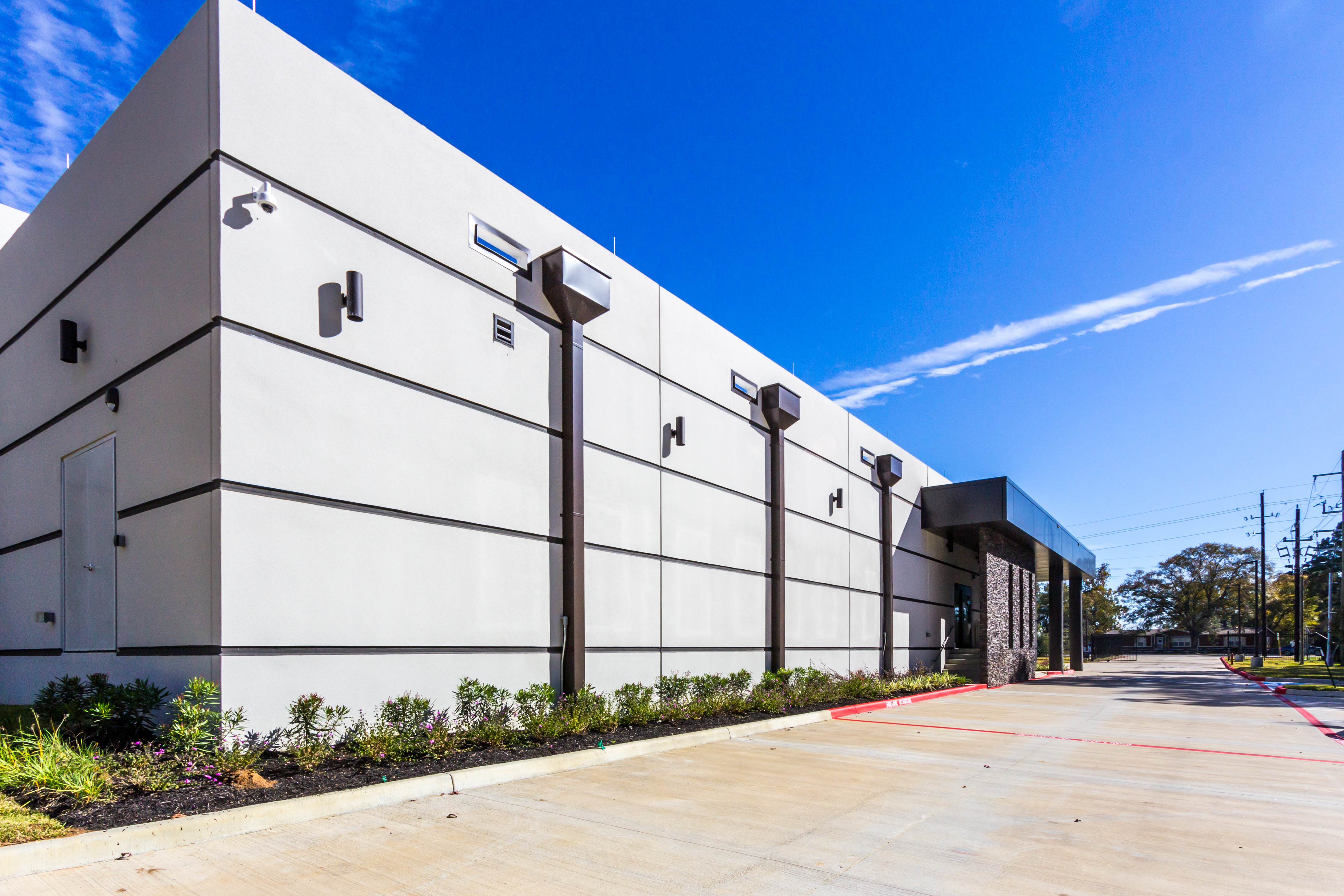
Dual backup power generators are located inside the building, enclosed and protected from weather. During Winter Storm Uri, a spare fuel truck was on-site, and technical staff were on duty around the clock to monitor and maintain generator performance. The datacenter remained on generator power for several days after power was restored to ensure any additional ERCOT power grid failures had no effect on clients. As a result, there was no downtime.

Facility Features
- Lots of room for further growth! The datacenter is planned to have over 125,000 sq. ft. of space, currently 12,000 sq. ft. are available today.
- Located in Spring, TX. The location is 65 miles inland from the coast and lies outside of the 500-year floodplain
- The datacenter was built 2 years ago. It’s a new modern design that utilizes latest building technology including better air flow for lower and consistent operating temperatures. All cables are securely protected below 4ft raised floors.
- Temperature is maintained at 72° F ± 6° F
- Construction is Zone 0 Seismic Code
- Maximum wind rating is 180+ MPH
- The sloping leak-proof roof is 4-inches thick
- Walls are 8-inches thick and made of reinforced concrete
- No rooftop equipment or roof penetrations are allowed, eliminating risk of rooftop damage during storms
- No pipelines or hazardous material storage is nearby
- Major highways are more than 1 mile away, and railway lines are more than 1.5 miles away
- Electrical design is N+1 including dual redundant UPS and battery backups. Automatic power transfer switches ensure a smooth transition to backup power. Contact us to learn more about optional A+B power option.
- Biometric Security and the datacenter is staffed 24/7.
- SSAE-16 compliant
Login to the Oplink.net portal https://my.oplink.net/
Click Services Menu >> Click My Services >> Click Manage Server next to the service you want to reinstall.
Click Reinstall button. Select OS
You can choose from a wide range of popular Linux or Windows distributions: AlmaLinux, CentOS, Debian, Ubuntu, Windows 11 Pro, or Windows Server 2022. Windows license is not included. We can also install custom ISO’s upon request.
We offer free helping hands services for this task. Please open a os reinstall request ticket and request a reinstall. We offer 1 free reinstall per month per server. Please include what OS or direct link to the ISO you want installed.
Any time you run any version of Windows and open remote desktop (RDP) you should secure access by IP address. This will limit what IP address can connected to your RDP port and try to login to Windows.
- Connected to your Server via remote desktop.
- Open Windows Defender Firewall. (Press Windows Key) and start typing Windows Defender Firewall
- Click on Inbound Rules in the left pane and locate Remote Desktop – User Mode (TCP-In) on the right side. Double click that rule to view it.
- Click the Tab Scope
- Move the bubble on Remote IP access to These IP addresses
- Add your local physical IPv4 address, if you don’t know what your IPv4 is goto: https://whatismyipaddress.com/ (on your home/work PC) (Don’t do this from your Server itself)
- Optional Add Oplink’s IP VPN if you ever lock yourself out or need support from us 216.230.230.2
- Click OK to save.
Server Return Packout Costs:
We charge a flat rate pack out fee per server, this doesn’t include carrier shipping fees or shipping label.
- 1U = $150
- 2U = $250
- 3U+ = Email Us
We use a proper server shipping box: https://www.newegg.com/p/3AU-060H-00004?Item=9SIAA65J9E4212
Note: We don’t stock the shipping boxes, so it might take a few days to get this.
You must create a ups.com or fedex.com account and send us a prepaid shipping label in PDF format prior. Make sure you add insurance to the shipping if you require it.
Pickup Address:
Oplink Loading Dock
2626 Spring Cypress Road
Spring, TX 77388
Recommended: Self Pickup, no charge option during business hours at the datacenter.
Looking Glass: https://speedtest.oplink.net/
As a company located within the boundaries of the Harris County Appraisal District (HCAD), OPLINK.NET Internet Services is required to comply with Section 22.04(a) of the Texas Property Tax Code. We receive instructions from the Chief Appraiser each January to file a report listing the name and address of each owner of property located in our facility as of January 1. These same instructions are sent to every datacenter and colocation service provider in Texas and service providers are legally obliged to comply within 30 days of HCADs request.
OPLINK.NET will comply with a reasonable and legal request from HCAD. Taken directly from HCADs instructions, the following information is requested:
- The physical address of the facility where the equipment is stored
- Owner’s name and mailing address
- Description of equipment (i.e. switching equipment, routers, fiber optic cabling, etc.)
- Length of time stored or in use at (the) facility
The information that OPLINK.NET provides to HCAD includes:
- Company name & contact person from the customer account record
- Mailing address from the customer account record.
- General description of installation (see below for more information)
- Length of time the customer has colocated with us.
The information that we provide with regard to a description of a customer’s installation is very general in nature. For instance, if a customer has 2 servers, that is all the information we report. If the customer has a 1/2 rack or a full rack installation, we report only the rack allocation, and not the equipment that is stored within that space. We do not provide a detailed inventory of the equipment. In addition, our facilities have never been toured or inspected by HCAD staff members. We make no attempt to estimate value or provide any information as to an asset list. Therefore, the information that HCAD receives is very general in nature.
Please note that the Business Personal Property tax is separate from and unrelated to a sales tax that we are required to levy on Texas residents for services that are provided.
We are not tax professionals and therefore cannot offer specific advice to customers who are in receipt of HCAD notices. However, we are able to offer general information based upon our experience and feedback that we have received from our customers.
- Your initial “Notice of Appraised Value” for your business personal property is likely to be unreasonably high. We understand that HCAD will often use a value at the top of the range for their initial assessment. This seems to be a strategy so that recipients of the notice will respond and arrive at a more reasonable figure. For example, we have been told that one customer received a tax assessment for a single server in excess of $10k.
- If you feel the value that HCAD has arrived at is unreasonable, we encourage you to make contact with HCAD staff. Our experience indicates HCAD staff is pleasant and reasonable to work with, and most issues can be resolved with a phone call. The HCAD Business Personal Property Division can be reached at 713-957-7800 or hcad.org.
Please keep in mind that OPLINK.NET does not make up the rules regarding the state Tax Code. We are merely required to follow the rules, as are all other legitimate colocation service providers in Texas. We will make every effort to assist our customers if they have special requests from us, but bear in mind that we are unable to intercede directly with HCAD on your account. If you have specific questions regarding a notice you have received from HCAD we encourage you to contact them directly for assistance.
Outlook and Thunderbird support AUTOCONFIG. They will pull all the email settings, all you need to do is enter your username and password.
General Mail Server Settings:
Username: [email protected]
Password: Use the email account’s password.
Incoming and Outgoing Server: mail.oplink.net
Incoming IMAP Port: 993
Incoming POP3 Port: 995
Outgoing SMTP Port: 465 or 587
Outgoing ALT SMTP Port: 10026 (Security: TLS or STARTTLS)
**Authentication is required for IMAP, POP3, and SMTP.
Important:
cPanel Web Hosting Clients with custom domain names will need to use:
Incoming and Outgoing Server: mail.yourdomain.com
*Please replace yourdomain.com with whatever you domain you have registered with us.
The easiest way to change your email password is via webmail.
- Login to Webmail: https://webmail.oplink.net/
- Click on the down arrow under your email address in the top right of the screen.
- Goto Password & Security
- Login to Spam Panel: https://login.antispamcloud.com/
- Once logged in use the left navigation menu Incoming >> Spam Quarantine
This will show any email stuck in QT for the past 14days. Anything past 14days we do not keep.
Here is how you can reboot your server from our client area portal:
- First goto https://my.oplink.net/clientarea.php and login.
- Click Services from the red menu bar and goto My Services.
- Find the Active Service that you want to reboot and click on it.
- In the left hand menu under actions click Reboot.
The process may take 5 minutes to complete depending on how fast your server boots up.
If you need additional help or still cant reach your server after reboot please open a ticket.