Server Colocation
Server colocation refers to the practice of housing a server or multiple servers in a data center facility. It allows businesses to take advantage of the infrastructure and resources provided by the data center, such as power, cooling, and network connectivity. At our north Houston, TX datacenter, you can securely store your servers in our state-of-the-art facility. We offer free rackmounts, network cables, and power cables to ensure seamless installation and setup. Additionally, our network provides robust DDoS protection, safeguarding your servers from malicious attacks. Whether you are running Windows or Linux servers, our colocation service offers the ideal environment for efficient and reliable server hosting.
100Gbps DDoS Protection included with all Colocation plans!
Server Colocation in Houston Pricing
Single 1U Server
- 1Gbps Unmetered Internet
- Always On DDoS Protection
- 1 AMP 208v Power
- Rackmounts & Cables Included
- Free Install
- Free Remote Helping Hands
Single 2U Server
- 1Gbps Unmetered Internet
- Always On DDoS Protection
- 1 AMP 208v Power
- Rackmounts & Cables Included
- Free Install
- Free Remote Helping Hands
Single 4U Server
- 1Gbps Unmetered Internet
- Always On DDoS Protection
- 1 AMP 208v Power
- Rackmounts & Cables Included
- Free Install
- Free Remote Helping Hands
Why Choose Oplink.net inside TRG Datacenters in Houston?
State-of-the-art Datacenter Facility
- At Oplink, our Houston colocation services are housed within the state-of-the-art TRG Datacenters facility, where we maintain a private colocation cage equipped with 27 full racks. This setup allows us to deliver scalable, secure, and reliable hosting solutions tailored to businesses needing high-performance infrastructure. TRG’s Houston data center, spanning 150,000 square feet, is designed for maximum uptime and efficiency, making it an ideal environment for our clients’ mission-critical operations.
Security and Compliance
- Security is paramount at Oplink’s Houston colocation setup within TRG Datacenters. Our private 27-rack cage is protected by layers of security, including customizable cabinets, motion sensors, and 24/7 camera security.
Flood and Hazard Mitigation
- Elevated at 37 meters and far from rail lines, highways, and hazardous sites, reducing exposure to floods, vibrations, or explosions. The facility’s hurricane-resistant design (rated for 185+ MPH winds) protects our clients’ infrastructure.
Proximity to Business Hubs
- Just 15 miles from Houston International Airport, 22 miles from Downtown Houston, and near The Woodlands, our site minimizes latency for Texas-based enterprises while offering easy access for on-site needs.
What’s included with Server Colocation?
We focus on single server colocation and include extensive features with tons of Bandwidth and DDoS Protection.
Server Colocation Made Easy
No contracts. We provide all ethernet cables, power cables, and rackmounts. You just bring or ship your server to the datacenter and we rack and stack it for you. Our colocation experts will guide you from start to finish.
Advanced Cooling
A 100% waterless system with hot-aisle containment supports high-density setups up to 50kW per cabinet, perfect for blade servers or AI workloads.
Free Technical Support
We love helping our clients. We provide free basic support for all servers we host. Our technicians have 20+ years of troubleshooting experience. While we hope that you don’t have to use it, our staff is available if you need us.
Free Always On DDoS Protection
Powered by 100Gbps Corero’s Smartwall we offer DDoS in real-time mitigation to server clients we host! The Smartwall sits at the edge of our network this provides the lowest latency and instant protection.
200Gbps Network
Premium core network, powered by dual 100Gbps Uplinks to Lumen and Cogent. All VPS/VDS nodes are powered by 10Gbps Internet.
Robust Power Systems
Powered by four diverse substations with 2(N+1) redundant configurations, including pure lead batteries and multiple 1.5 MVA generators that kick in within 10 seconds. This ensures uninterrupted service for your equipment in our 27 racks, backed by infinite fuel resupply contracts.
Server Colocation FAQs
Our network offers the lowest latency multi-homed backbones with 100Gbps Uplink to Lumen and 100Gbps Uplink to Cogent. We include Free DDoS Protection with up to 100Gbps powered by Corero. Our high bandwidth network will provide you with the fastest network connection at all times.
All Cloud VPS plans include:
10Gbps Internet Ports, the monthly data limit is listed on the plan specs.
All Colocation & Dedicated Servers include:
1Gbps Unmetered port, Optional Upgrade to 10Gbps, Email us for details [email protected]
The Oplink.net datacenter is located in Spring, Texas. Our colocation facility consists of 27 racks located in a large private cage inside the TRG Datacenter.
Oplink.net Datacenter (inside TRG Datacenters)
2626 Spring Cypress RD
Spring, TX 77388
281-445-9800
All colocation, dedicated servers, virtual private servers, and virtual dedicated servers are located in this colocation facility.
Yes, we operate with a 100% uptime guarantee for all server colocation customers. All colo servers in our facility offer N+1 electrical design with dual redundant UPS and battery backups. Dual backup power generators are situated inside the building and protected from weather. This all ensures the risk of downtime is completely minimized.
Our colocation facility is indeed carrier neutral. The data center isn’t owned or managed by a specific ISP – we find this affords our customers a greater degree of control and flexibility.
Yes, we do offer reverse IPv4 DNS with all services. At this time we do not offer RDNS for IPv6. All RDNS requests can be made by opening a ticket.
To setup RDNS on your static IP(s) please open a ticket.
Copy-n-Paste the following template into the body of the ticket and edit it for your IP & host.domain.com.
1 IN PTR host.domain.com.
2 IN PTR host.domain.com.
3 IN PTR host.domain.com.
*Please make sure you leaving the trailing . at the end of each PTR record.
Any client running a email server MUST have a PTR record per our AUP.
Yes, you must open a ticket to request an appointment to access your equipment inside the datacenter. We prefer a 24 hour notice if possible. We will respond to the ticket quickly and send further directions for your visit.
Yes, many of our out of state clients ship us hardware. Our team offers a full rack and stack service at no cost. We also provide all rackmounts and cables. Please contact us to coordinate your install before shipping any hardware.
Speed test: https://oplink.speedtestcustom.com/
Raw Speed test File: https://www.oplink.net/speedtest/raw/1000mb.zip
Test IP: 216.230.224.34 or 216.230.227.34
We offer High Storage VPS Stash accounts that you can backup data to. They include 2TB of storage, they make great backup destination that you can fully customize.
Yes, we provide a /64 with all colocation or dedicated servers upon request from the client.
Yes, in May 2020 we added a hardware DDoS Protection based solution powered by Corero. We include up to 100Gbps DDoS Protection on Colocation, Dedicated Servers, Web Hosting, Virtual Private Servers, and Virtual Dedicated Servers. The system runs in the background and filters out attack patterns at the packet level. DDoS Protection are provided as a fair-share-resource.
Oplink.net has been in business since 1999.
We strive to approve all orders as fast as possible after payment is made. In very rare cases, your account may be flagged for fraud which could result in an delay. Sometimes we may ask for a copy of your photo ID for additional anti fraud verification. If this happens please email contact us by opening a ticket.
- All VPS/VDS/Web Hosting orders are setup and provisioned the same day.
- All Dedicated Servers orders are setup and provisioned in 24hrs or less. Custom orders may take longer.
- All Colocation installs are setup by appointment next business day after the order is placed.
- All Fiber Internet Services orders can take 5-7 business days to install depending on the location.
We currently accept Visa, Mastercard, Discover, American Express, and PayPal.
If you use PayPal, we recommend a PayPal subscription and automatically withdraw the money on the due date every month, if you do not wish to setup a subscription you can also pay it manually every month.
All servers come with FREE Remote Hands during business hours. We provide you with 1 hour FREE remote hands or direct onsite access to your colo server at the datacenter.
What is included with FREE Remote Hands?
- Remote Reboots
- Level 1 Server Basic Troubleshooting
- Insertion of media
- Upgrading or removing components: hard drives, cpu, or memory
- Basic Config or Bios changes
- Free Remote Spider KVM rental, first come first served
- 1 Free OS Reinstall per month
What do you charge for Remote Hands After business hours?
- After Business Hours fees are $250/hour
- For over 16 years the Oplink.net primary datacenter was in Houston’s Level3 facility. In the summer of 2021 we moved out of Level3 and into TRG Datacenters in Spring, TX.
Power Design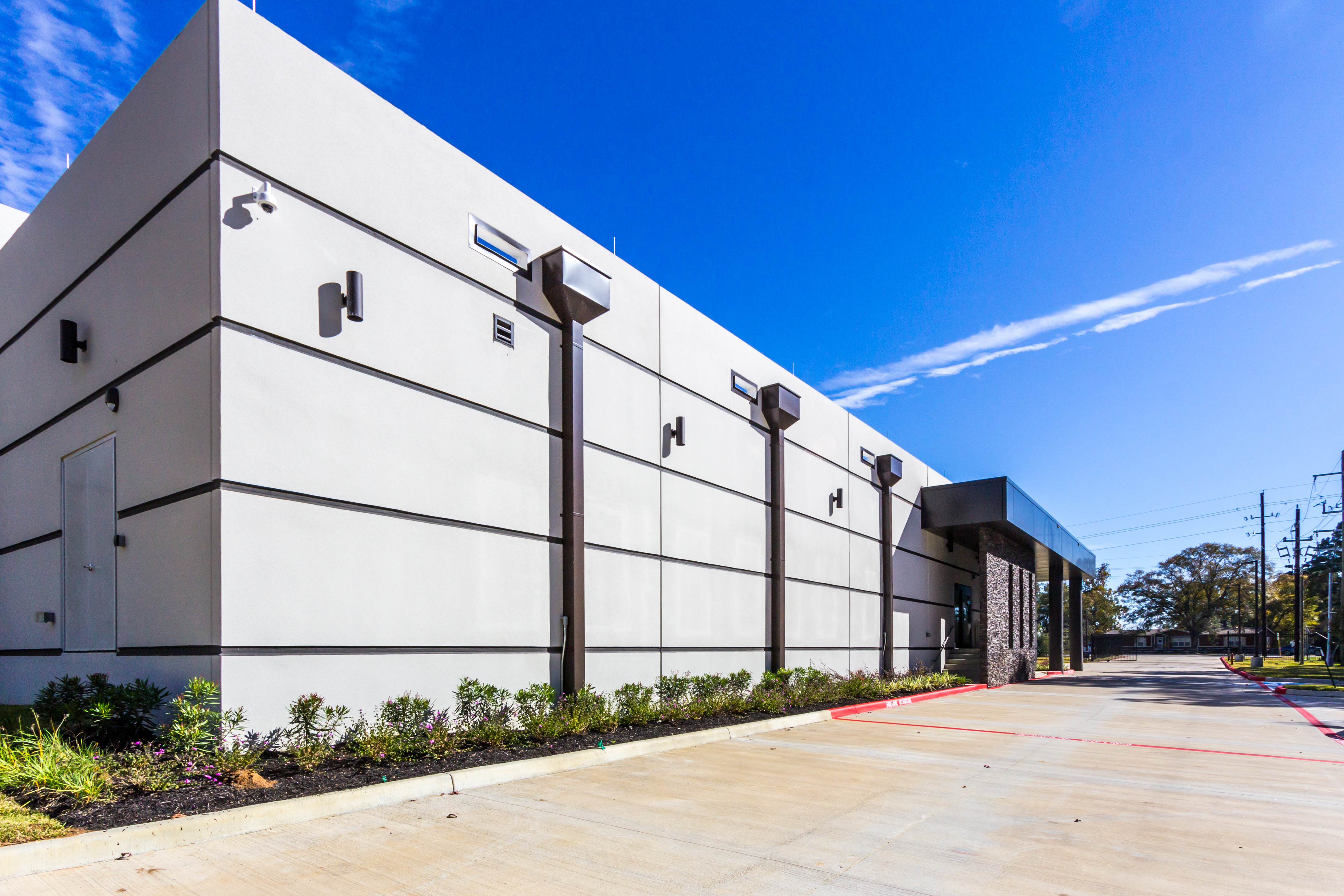
Dual backup power generators are located inside the building, enclosed and protected from weather. During Winter Storm Uri, a spare fuel truck was on-site, and technical staff were on duty around the clock to monitor and maintain generator performance. The datacenter remained on generator power for several days after power was restored to ensure any additional ERCOT power grid failures had no effect on clients. As a result, there was no downtime.

Facility Features
- Lots of room for further growth! The datacenter is planned to have over 125,000 sq. ft. of space, currently 12,000 sq. ft. are available today.
- Located in Spring, TX. The location is 65 miles inland from the coast and lies outside of the 500-year floodplain
- The datacenter was built 2 years ago. It’s a new modern design that utilizes latest building technology including better air flow for lower and consistent operating temperatures. All cables are securely protected below 4ft raised floors.
- Temperature is maintained at 72° F ± 6° F
- Construction is Zone 0 Seismic Code
- Maximum wind rating is 180+ MPH
- The sloping leak-proof roof is 4-inches thick
- Walls are 8-inches thick and made of reinforced concrete
- No rooftop equipment or roof penetrations are allowed, eliminating risk of rooftop damage during storms
- No pipelines or hazardous material storage is nearby
- Major highways are more than 1 mile away, and railway lines are more than 1.5 miles away
- Electrical design is N+1 including dual redundant UPS and battery backups. Automatic power transfer switches ensure a smooth transition to backup power. Contact us to learn more about optional A+B power option.
- Biometric Security and the datacenter is staffed 24/7.
- SSAE-16 compliant
We offer free helping hands services for this task. Please open a os reinstall request ticket and request a reinstall. We offer 1 free reinstall per month per server. Please include what OS or direct link to the ISO you want installed.
Any time you run any version of Windows and open remote desktop (RDP) you should secure access by IP address. This will limit what IP address can connected to your RDP port and try to login to Windows.
- Connected to your Server via remote desktop.
- Open Windows Defender Firewall. (Press Windows Key) and start typing Windows Defender Firewall
- Click on Inbound Rules in the left pane and locate Remote Desktop – User Mode (TCP-In) on the right side. Double click that rule to view it.
- Click the Tab Scope
- Move the bubble on Remote IP access to These IP addresses
- Add your local physical IPv4 address, if you don’t know what your IPv4 is goto: https://whatismyipaddress.com/ (on your home/work PC) (Don’t do this from your Server itself)
- Optional Add Oplink’s IP VPN if you ever lock yourself out or need support from us 216.230.230.2
- Click OK to save.
Looking Glass: https://speedtest.oplink.net/
Here is how you can reboot your server from our client area portal:
- First goto https://my.oplink.net/clientarea.php and login.
- Click Services from the red menu bar and goto My Services.
- Find the Active Service that you want to reboot and click on it.
- In the left hand menu under actions click Reboot.
The process may take 5 minutes to complete depending on how fast your server boots up.
If you need additional help or still cant reach your server after reboot please open a ticket.